Upvote 1

Simulate prototype stopped working

Known Thomas Krause 4 years ago

After updating to JIM 9 a couple of weeks back everything seemed to work fine.


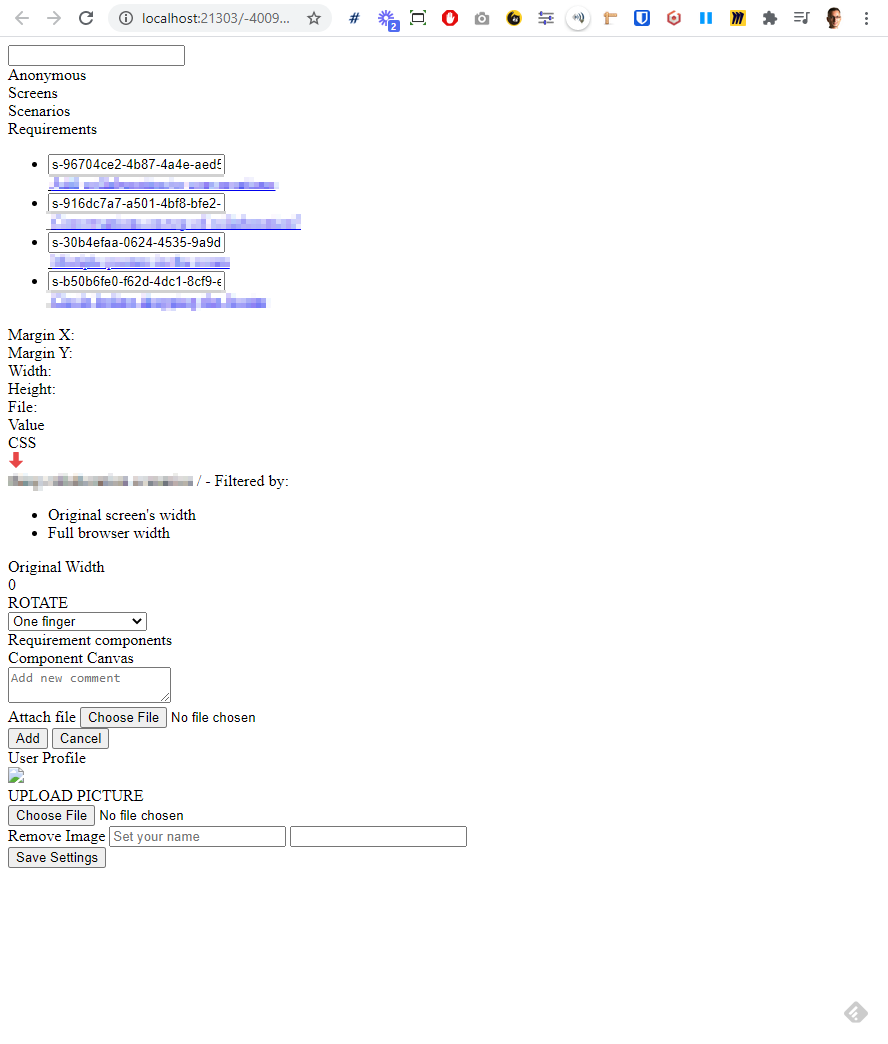
Now unexpectedly (in a customer session) Simulate prototype stopped working. It shows the page in a fragmented raw HTML way, not usable.

I've attached a screenshot and the JS console log.
Replies (2)
photo
1

Hello,


Could you send us your log files so then we can take a look and find a solution?


You can find them by following this file path:


On Mac: [folder of the user]/justinmind/version/logs.log


On PC: (C://users/youruser/Justinmind[version]/logs.log)


There may also be a file called logs.log.1 in that folder. If it's also listed, please attach it as well.


Thank you kindly,

-Chloe

photo
1

Here's the log.

Files: logs.log
photo
1

Hello,

Could you try following this process to uninstall Justinmind and then reinstall it?

Here is how:

- Uninstall version 9

- Go to your user's folder, open the Justinmind folder there and delete any folder that has 9.0 or any version starting with 9

- Download the installer from here https://www.justinmind.com/download

- Install and launch again


Please let me know if this works.

photo
1

Same issue. Here's the log file entry:


[2876856548222340219] [2020-11-23 09:53:03] INFO com.justinmind.generator - simulation: [installPath=/C:/Program Files/Justinmind/Justinmind 9.1.10/app/configuration/org.eclipse.osgi/10/0/.cp/, outputPath=C:/Users/Thomy/Justinmind/9.1.10/work/-2133172550342298117/, optimize=true]

[2876856548222340219] [2020-11-23 09:53:03] ERROR com.justinmind.generator - generation failed

[ACCESS_DENIED, PATH_ERROR] com.justinmind.generator.engine.GeneratorException: java.io.IOException: The filename, directory name, or volume label syntax is incorrect

at com.justinmind.generator.engine.output.pM.a(pM.java:25)

at com.justinmind.generator.context.htmlwidget.HtmlWidgetController.generate(HtmlWidgetController.java:55)

at com.justinmind.generator.engine.pB$uY.run(pB$uY.java:158)

Caused by: java.io.IOException: The filename, directory name, or volume label syntax is incorrect

at java.base/java.io.WinNTFileSystem.createFileExclusively(Native Method)

at java.base/java.io.File.createNewFile(File.java:1024)

at com.justinmind.util.file.FileUtils.deepCreateFile(FileUtils.java:124)

at com.justinmind.generator.engine.output.pO.a(pO.java:45)

at com.justinmind.generator.engine.output.pO.a(pO.java:32)

at com.justinmind.generator.engine.output.pM.a(pM.java:17)

... 2 more

photo
1

Just an idea: ACCESS_DENIED on an installation directory is understandable, shouldn't a process write into the user directory instead?


OK, ignore this comment. C:/Users/Thomy/Justinmind/9.1.10/work should be writable.

photo
1

Hello,

Thank you for trying that approach. Does this problem only happen with a specific prototype?

Thank you kindly,

-Chloe

photo
1

Indeed. It doesn't happen for my older prototypes. I can send you the problematic one if you want to drill into the issue. What's a good channel to send it to you?

photo
1

Hello,

You can compress the .vp file into a .zip/.rar and attach it here. Once it has been downloaded, we will delete it from the comment so then no one else can look at it.

Thank you kindly,

-Chloe

photo
Leave a Comment
 
Attach a file
You can't vote. Please authorize!